Showing posts with label Samsung. Show all posts

Trick To Get Free IPL Commentary On All Networks


Hi Friend's,
After Lot Of Days I Am Again Back To Give You New Tricks.
 
Here Is An Exclusive Trick To Get Free IPL Commentary On All Indian Mobile Networks. Just Follow Below Tricks And Enjoy Free IPL Commentary On Mobile.

1) Listen To Live Commentary:-
This Trick Works With Every Operator Just You Need To Maintain Your Balance Less Than One Rupees.
Dial 58888064 From Your Mobile And Activate The IPL Plan.
The Plan Deducted Rs.5 Per Day From Your Balance, But Due To Some Bug This Service Also Activated In Null Balance.
To Get The Score Dial The Same Number.
Hurry! You Have Now Able To Listen Free IPL Live Commentary.
 
2) Free IPL Scores Via SMS:-
Give A Miss Call To 18002081021
You Will Be Registered To Receive Cricket Scores Via SMS
The Service is Officially Free And You Will Not Need To Pay for It.
Both Tricks Are Tested And Working In All India With Every Operator.
For Latest Mobile Tricks Visit Us Regularly.
Don't Forget To Like Us On Facebook.

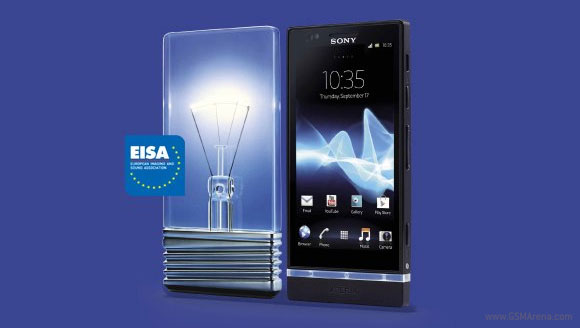
HTC, Samsung and Sony smartphones grab EISA awards


HTC, Samsung and Sony have a reason to celebrate today - their smartphones picked several EISA (European Imaging and Sound Association) awards in different categories.
And if you're wondering what EISA is, it's an industry body representing 50 tech-focused magazines from 19 European countries and it gathers every year to award the best devices in different categories.
Samsung scooped four awards, one of which was for its Android flagship, the Galaxy S III. The Samsung I9300 landed the EISA award for best European mobile phone. Sony got the Green Award for the second time in a row. In 2011, the Xperia mini and Xperia arc received the Green Award, and this year it's the Xperia P.
HTC didn't leave empty-handed either. The One S got the Social Award for its best-in-class social features in the Sense 4.0.

Free bluetooth for samsung galaxy tab 2 owners


Note:- This is only for those owner who have bought Samsung Galaxy Tab 2 between 1st August 2012 to 31st August 2012.

Samsung giving free Bluetooth to every samsung galaxy tab buyers who have bought  Samsung Galaxy Tab 2 between 1st August 2012 to 31st August 2012.
How to get:-
Step 1 :Keep your invoice ready in a jpeg or PDF format by scanning invoice
Step 2 :Visit here
Step 3 :Click avail offer
Step 4 :Enter your imei number (to get press *#06#), Mobile number, email id, agree with terms and condition now click submit
Step 5 :Submit your contact &shipping details &
Step 6 :Upload the invoice copy
Step 7 :Automatic reference number will be generated

 You will get an email with shipping details when product is shipped.

How to change the lock screen shortcuts on a Samsung Galaxy S3?


The first stage is to open up your home screen and then press the phone's "menu" button (the button that is next to the home button). This will open up the home screen menu which should look something like the small list on the image on the left. The list will feature "Edit", "Create folder", "Search" and "Settings", from here you need to select "Settings".

After entering the "Settings" screen you will see a screen like the one on the right with a list of various settings that you can tinker with. From the list you need to scroll down to the "Security" setting which you can see in the image on the right hand side. 

After opening the "Security" settings you will see a new list of items. From this screen you need to select the second option down entitled "Lock screen options". 

 Inside the "Lock screen options" screen you will see another list 
of options with the top one being "Shortcuts" being the top one.
Beside "Shortcuts" you will see a green icon, leave the green icon alone (or if it's not there then slide the grey icon over so it becomes green). This will simply mean that shortcuts are actually on your home screen. After making sure that shortcuts are on, click on the word "Shortcuts".

After clicking on "Shortcuts" you should see a screen like the one on the left with the icons you currently have as shortcuts showing. From here you need to select the shortcut you would like to replace. For this example I'm going to replace the "S Voice" icon with the "Music player" icon, allowing me to go straight to my music player from the lock screen, though you can select any app on your phone. So at this point select (or press on) the icon that relates to the app you would like to replace.

After clicking on the app you want to replace you will be given a list of all the apps on your phone. From here you select the app icon you wish to have a shortcut too.  What you need to remember at this screen is that they are in alphabetic order so you may need to scroll through a lot of apps before finding the one you want to use. After finding the app you want to use click on the icon.

After clicking the icon of the app you want to use you will be taken back to the previous screen though now the app you wish to use will replace the app that you wanted replace. As you can see in our screen shot, the "S Voice" has been replaced by the "Music player" icon.

Now you are effectively done and can either go back to fiddle with other settings that you may want to change or you can go back to the home screen (or do whatever else you wish to do with the handset). Just remember the next time you lock the phone you will see the new icon where the other one was. As you can see in this final picture, the "Music player" app is now on the lock screen as a shortcut.

Samsung Galaxy Skin Specification,Info & Price


Samsung Galaxy skins The particularity of this project is the latest generation represented by the use of special materials that make the terminal fully flexible and thin as a sheet of paper. The concept, called Samsung Galaxy skins, can fold into two or four parts as needed or being used as a video projector.

For the rest of the specifications, the designer of the concept was limited to a classic setup: 4-inch Super AMOLED display with a resolution of 800 × 480 pixels, 8 megapixel camera (like Samsung Galaxy SII future iPhone or 5) and the possibility of realizing high resolution video at 720 pixels. Finally, with regard to the operating system, Heyon You opted for a futuristic version of Android, maybe, who knows that Google is already working.


So, we’ve seen dual-core processors in phones, Massive screen sizes that are too big to fit in your pocket and we’ve even explored the third dimension with phones like the Optimus 3D and Evo 3D. Where do we go from here? How about flexible displays then. Samsung showed off their concept phone, called the ‘Skin’ in South Korea in June and earlier, at CES 2011. The phone uses a special flexible AMOLED screen instead of glass that uses a plastic polyimide substrate. Due to this, the display is flexible enough to bend around a cylinder measuring just an inch in diameter

According to various sources, Samsung has confirmed that they will be putting this into production as the large scale manufacturing of these flexible AMOLED displays will begin in Q2 of 2012. If all goes as planned, we can expect the phone to hit the shelves by the end of 2012. The final product may not look exactly like the one in the picture, but at least it will be the next step in mobile evolution.


Samsung Galaxy Skin smartphone features and Specifications :

Netowork: 
3.5G (GSM/ GPRS/ EDGE) : 850/ 900/ 1800/ 1900 MHz
4G (HSDPA 7.2Mbps, HSUPA 5.76Mbps) : 900/ 1900/ 2100 MHz

Display : 
4.0″ WVGA SUPER AMOLED (800×480) Flexible Type

Video:        
 HD(720p @ 30pfs) Video playing & recording Codec: mpeg4, H.264, H263, H263Sorenson,
 Divx HD/ XviD, VC-1 Format: 3gp (mp4) WMV (asf), AVI(divx), MKV, FLV

Value-added Featured: 
Integrated Messaging “Social Hub”Android market for more application and contents A-GPS Augmented reality with layer Browser 1GHz Application Processor SMS/ MMS/ Email/ Video Messaging/ Exchange ActiveSync.

Sensor :
Accelerometer, Digital compass, Proximity, Light Offline & No SIM Mode, Voice Command,                       RSS Reader, Widget, Smart Security

OS:
Android.Flexy

Camera:
8.0 Mega Pixel + VGA Telephony Camera, Auto Focus, Self shot, Action Shot, Panorama                  Shot, Stop Motion, Smile Shot, Add me

Audio:
MP3, AAC, AAC+, eAAC+, WMA, OGG, AMR-N8, AMR-W8, WAV, MID, AC3,             IMY, FLAC, XMF

Connectivity:
Bluetooth technology v 3.0 USB V 2.0 (High Speed) Wi-Fi 802.11 b/g/h

Memory:
32GB/ 16GBSize: 221 x 67 x 8 mm

Battery:
1500mAh